Fee tracking & client statements
Every case's figures, exact and clear at a glance. MOHKAM follows each case's agreed fees, payments and expenses, splits out 5% VAT to the fils, and leaves invoicing to your accounting system.
What it does
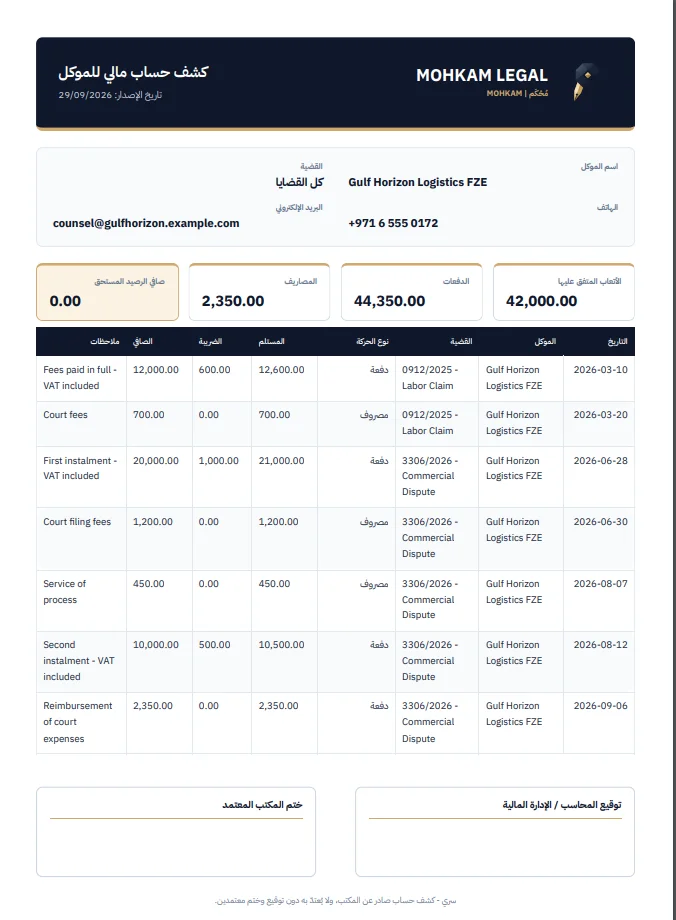
- Receipt and payment vouchers on every case, marked VAT-inclusive or not; the system splits the net amount from the VAT automatically.
- Every amount is stored as whole fils, so nothing is lost to rounding, and the database itself refuses a voucher whose net and VAT do not add up to its total.
- A client statement for one case or all of a client's cases: fees, payments, expenses and balance, as A4 print or PDF, e-mail in the firm's design, and Excel.
- Your accounting system's invoice number on each voucher, for reconciliation only; MOHKAM never issues or numbers invoices, and every statement says it is a follow-up, not a tax invoice.
- The accountant's register: any period (this month, last month, this year) with totals of payments, VAT, net and expenses, and an Excel export of the period.
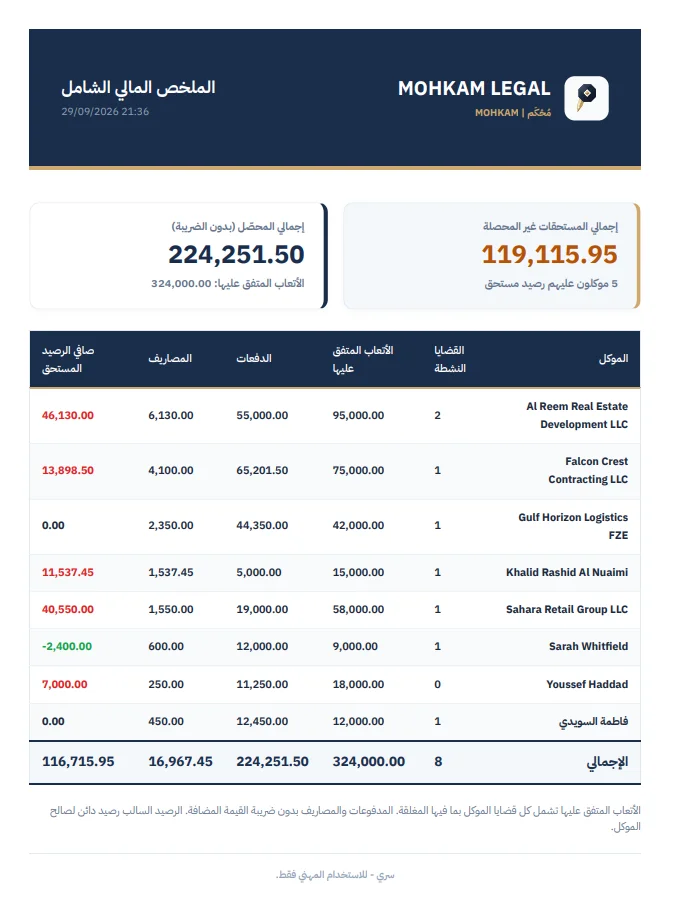
- A full financial summary across clients that matches each client's statement exactly, and a chart of monthly collections on the dashboard.
- Fee installment schedules with e-mail reminders to the client, and a ready WhatsApp summary that opens from your own account for you to review and send.
- Financial modules and fees show only to the managing partner and the accountant.
How it works
- Record the agreed fees on the case, then the receipt and payment vouchers.
- The system splits out VAT and calculates balances automatically.
- Issue the statement, the period register or the financial summary in the format you need.
Frequently asked questions
Does MOHKAM issue tax invoices?
No. MOHKAM follows each case's money; tax invoices come from your firm's accounting system. You can record that invoice's number on the voucher for reconciliation.
Who in the firm sees the financials?
Only the managing partner and the accountant. Financial modules and fees are hidden from advocates and read-only users.
Are WhatsApp messages sent to clients automatically?
No. The message is prepared and opens from your own account for you to review and send.
More features
- Clients & casesA file for every client and case: opponent, client capacity and case status, with hearings, experts, tasks and transactions linked to the case itself.
- Hearings & court rollA print-ready A4 court roll, automatic reminders 48h, 24h and 2h before each hearing, a formal client notice, and hearing minutes stored securely as PDF.
- Calendar & case timelineEvery date of the firm in one calendar: hearings, tasks, appeal deadlines, experts, fee installments and cheques, by month, week or day, plus a timeline that tells each case's story.
- Tasks & remindersTasks linked to cases and assigned to team members, with a priority and a deadline, e-mail reminders 48h, 24h and 2h ahead, and a daily summary for each member.
- Notifications & daily summaryA daily summary of each member's own work, a client notice when a hearing is scheduled, moved or cancelled, and hearing, task, appeal and fee reminders, all from the firm's e-mail and never twice.
- Expert proceedingsExpert files of every type: deposit and paying party, expert meetings, file stages to the final report, the objection window and a follow-up radar.
- Fee installments & client remindersSplit a case's fees into dated installments; MOHKAM tracks what is paid, due and overdue from the payments received, and reminds the client before, on and after each due date.
- Cheques & appeal deadlinesReceived and issued cheques in several currencies linked to the client and case, and the last day to appeal calculated with the required action and alerts 10, 5, 2 and 1 days ahead.
- Enforcement & recoveryAn enforcement file for the enforcing party or the judgment debtor: requests and decisions, restrictions such as freezes and travel bans, and claimed, deposited and remaining to the fils.
- Police & prosecutionPolice reports across all seven emirates: the client's role, the report type, a colour-coded investigation status, and the Public Prosecution number on referral.
- Client portalA read-only portal your client opens with a code sent to their e-mail: their cases, hearings, enforcement files, police reports, statement and a timeline per case, without decisions or internal notes.
- Smart Lawyer (AI)Twelve AI legal tasks under advocate supervision: drafting claims and notices, reviewing expert reports and contracts, finding contradictions and analysing cases, with Word export.
- Executive reportsFour reports ready to print on A4 letterhead or e-mail: the court roll, the appeal deadlines docket, the full financial summary and the client portfolio.
- Team, access & auditFour roles: managing partner, advocate, accountant and read-only, each seeing only what it needs, with an audit trail of every change and deletion, secure sign-in sessions and isolation of each firm's data.
- Office e-mail & noticesReminders, the daily summary, client notices, reports and statements sent from your firm's own e-mail (Gmail, Yahoo or your own server) in the firm's design, with retry on failure.