Smart Lawyer: AI legal drafting & analysis
A faster first draft and a deeper analysis, while the final word stays with the advocate. Smart Lawyer works from the facts you write and the documents you upload, and nothing is used before the advocate reviews and approves it.
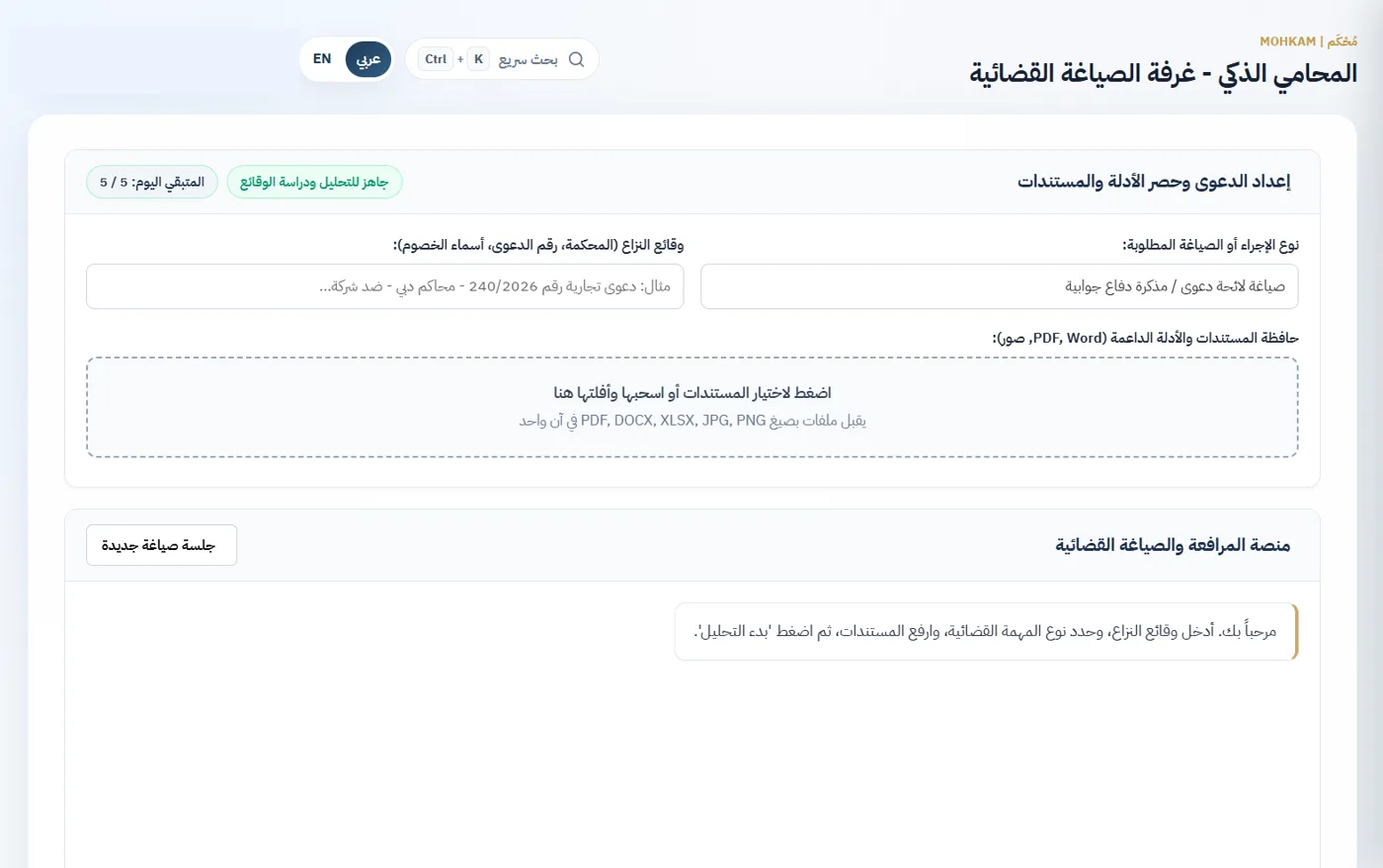
What it does
- Judicial drafting: statement of claim or defence memo, legal notice or formal demand, and official legal correspondence.
- Auditing and technical review: review and rebut an expert report, check documents for contradictions, audit financial and tax claims, review contracts, and inspect documents and evidence.
- Legal studies and execution: a full case analysis with strengths, weaknesses and risks, a reasoned legal opinion, an execution file analysis with next steps, an executive case summary, and an evidence index and document bundle.
- Upload documents and evidence: PDF, Word, Excel, images and text.
- The result streams as it is written; a long pleading continues in the same bubble with “continue drafting”, then is copied or exported to Word in the firm's font to finish in its style.
- Every reply carries a notice that it is an assisting draft that may contain errors, not a legal opinion or a court decision, and the assistant never files or sends anything on its own.
- A policy per firm: sending the firm's documents to the AI can be switched off, every document sent or blocked is in the audit log, and files are deleted from Google when the conversation ends.
- Available by role, with a daily usage allowance per user.
- Runs on the paid, business-grade Google Gemini API; your firm's data is not used to train models.
How it works
- Pick the legal task from the list.
- Upload the documents and set out the case facts and the client's requests.
- The advocate reviews, edits in Word and approves the output before any use.
Frequently asked questions
Does the assistant file anything on its own?
No. It produces an assisting draft to copy or export to Word for the advocate to finish and approve; it cannot file or send anything.
Is our firm's data used to train the AI?
No. The assistant runs on the paid Google Gemini API, and data sent through the paid API is not used to train models.
What stops a drafting mistake from reaching court?
The assistant is bound by rules in our system: it cannot file or send anything, and it must not invent facts or case numbers. A machine draft can contain errors, which is why every reply reminds you that advocate review is mandatory.
More features
- Clients & casesA file for every client and case: opponent, client capacity and case status, with hearings, experts, tasks and transactions linked to the case itself.
- Hearings & court rollA print-ready A4 court roll, automatic reminders 48h, 24h and 2h before each hearing, a formal client notice, and hearing minutes stored securely as PDF.
- Calendar & case timelineEvery date of the firm in one calendar: hearings, tasks, appeal deadlines, experts, fee installments and cheques, by month, week or day, plus a timeline that tells each case's story.
- Tasks & remindersTasks linked to cases and assigned to team members, with a priority and a deadline, e-mail reminders 48h, 24h and 2h ahead, and a daily summary for each member.
- Notifications & daily summaryA daily summary of each member's own work, a client notice when a hearing is scheduled, moved or cancelled, and hearing, task, appeal and fee reminders, all from the firm's e-mail and never twice.
- Expert proceedingsExpert files of every type: deposit and paying party, expert meetings, file stages to the final report, the objection window and a follow-up radar.
- Fees & client statementsAgreed fees, payments and expenses on every case with 5% VAT split out to the fils, a client statement to print, e-mail or export to Excel, and a period register for the accountant.
- Fee installments & client remindersSplit a case's fees into dated installments; MOHKAM tracks what is paid, due and overdue from the payments received, and reminds the client before, on and after each due date.
- Cheques & appeal deadlinesReceived and issued cheques in several currencies linked to the client and case, and the last day to appeal calculated with the required action and alerts 10, 5, 2 and 1 days ahead.
- Enforcement & recoveryAn enforcement file for the enforcing party or the judgment debtor: requests and decisions, restrictions such as freezes and travel bans, and claimed, deposited and remaining to the fils.
- Police & prosecutionPolice reports across all seven emirates: the client's role, the report type, a colour-coded investigation status, and the Public Prosecution number on referral.
- Client portalA read-only portal your client opens with a code sent to their e-mail: their cases, hearings, enforcement files, police reports, statement and a timeline per case, without decisions or internal notes.
- Executive reportsFour reports ready to print on A4 letterhead or e-mail: the court roll, the appeal deadlines docket, the full financial summary and the client portfolio.
- Team, access & auditFour roles: managing partner, advocate, accountant and read-only, each seeing only what it needs, with an audit trail of every change and deletion, secure sign-in sessions and isolation of each firm's data.
- Office e-mail & noticesReminders, the daily summary, client notices, reports and statements sent from your firm's own e-mail (Gmail, Yahoo or your own server) in the firm's design, with retry on failure.